Monday, December 30, 2019

Microsoft Dynamics 365 Quick Campaign


Microsoft Dynamics 365 provides the Campaign feature which can be used to organize your project for marketing over a period of time. Campaigns were designed to assist you to keep track of your revenue and investment with each campaign. It also tells you how effective your efforts and strategies are by tracking the ongoing and previous projects.

What are the Quick Campaigns?

Quick Campaigns are the single campaign activity toward a targeted audience or for targeted projects. You can track the success of a quick campaign through the campaign response, and convert the response to orders, leads or opportunities. Using a quick campaign in Microsoft Dynamics 365, you can send an e-mail to an individual or audience who are interested in your specific product or service.

Quick Campaigns VS. Campaign:

Unlike the campaign, a quick campaign can be created from a marketing list which is a single activity to a distribution list. The created activity can be targeted for a single individual, a team manager, owners of the customer record or save to a queue. Here are some key differences between Quick Campaigns and Campaigns:


           Quick Campaigns
            Campaigns
  • Single activity type
  • One targeted list of consumers
  • Fast execution
  • No built-in metrics
  • No templates
  • Uses email templates
  • Fast learning curve
  • Long duration
  • Targets multiple or all customers
  • Associates with price, products, and sales
  • Built-in metrics
  • It has its own templates
  • Also, uses email templates
  • Supports planning


Creating a Quick Campaign in Dynamics 365:

There are two available options to create a Quick Campaign. One is from the marketing list and another is from a list of records.

Using the Marketing list:
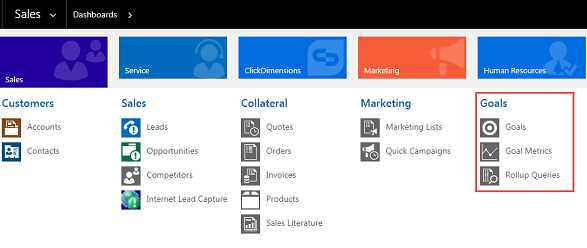
  • Open the navigation bar and click on the Sales or Marketing area,
  • Select Marketing Lists,
  • Choose the list you want to distribute on your Campaign,
  • Click Create Quick Campaign from the command bar,
  • Follow the steps of the Quick Campaign setup wizard.
Using the list of records:
  • Open the navigation bar and click on the Sales or Marketing area,
  • Select Sales and navigate to the list of contacts, leads or accounts,
  • Highlight the record you want to add to your campaign,
  • Click for more options icon (…) and click Quick Campaign,
  • Select the appropriate option to set the Quick Campaign on Live.

Advantages of Quick Campaign:

Microsoft Dynamics 365 Quick Campaign allows you to keep track of an individual buyer or a specific team. So, you can provide the best solution for their needs.
The quick campaign allows you to stay up to date with clients, which can improve Customer Relationship with your services. Which also makes your business more profitable and less stress.
Quick Campaign can be used to set an estimated goal for a particular group of people, which can assist you to reach the upcoming goals.
The quick campaign is an excellent feature of Microsoft Dynamics that can be used to increase the productivity of your business and a better Customer Relationship Management team.

Microsoft Dynamics 365 Sales Insight


Microsoft Dynamics 365 is a best in class sales automation application that is capable of managing your entire business development process. For organizations that provide professional services and looking to improve their business development activities, this Microsoft Dynamics 365 sales Insight is the best solution available. It is available on the web interface to browse instantly from anywhere, embedded directly to Microsoft outlook and built-in mobile application.
Dynamic 365 sales can assist your business to see from a 360-degree angle to find difficulties, increase the revenue to the maximum level and more effectively cooperate with teams. Managing lead and close more sales with Microsoft Dynamic 365 was never been easier before.

Important features to look at Microsoft Dynamics 365 Sales Insight:

The Microsoft Dynamics 365 Sales Insight delivers the best CRM capabilities that can help you to optimize your business development process and earn a lot of revenue out of it. Here are some of the excellent features of Microsoft Dynamics 365 sales solution has that can rapidly boost your business:

  • Mobile access: With built-in mobile application access, you can easily update key information using smartphones with your fingertips from anywhere.
  • Outlook integration: Outlook integration allows automatic synchronization between web servers and outlook to derive productivity and increase user experience.
  • Lead tracking: Lead tracking allows you to track different databases of purchases and leads which can be used to maintain the sales ratio and increase business activity.
  • Data management: Data management allows you to keep track and analyze the active pursuits and proposals, which can increase the revenue opportunity.
  • Account and Contact Management: Account and Contact management allows you to keep track of the clients and contact information. It can also manage data from InsideView and LinkedIn contacts. This can impact on communication with clients in a better way, thus increasing the sales of your business services.
  • Dashboard and Analytics: Dashboard and Analytics are the panels that are integrated with Microsoft's advanced technology, and it quickly identifies and analyzes trends based on your previous sales and activity. It also analyzes the client’s communication information, sales and previously available quantities of services from your records and predicts the best solution to boost your business and increase sales.
  • Manages Competitors: Microsoft Dynamic 365 sales solution also keeps track of the different preset competitors and analyze their progress to help you make better strategies to efficiently improve your business.
  • Activity management: Activity management records all the information about the previous sales and orders to maintain the best leads. It also makes sure that your sales activities don’t slip through the cracks.
With the technology available today, your clients are aware of so many things you may never realize. With this much information known to your clients, your business should make new selling decisions and adopt a new consumer journey. At this point, your business and sales team can stay focused on the right clients, sale more and win faster by using Microsoft Dynamics 365 sales insight. And build a secure relationship with consumers through personalized and relevant engagements.

Microsoft Dynamics 365 Sales Goal Metrics


In Microsoft Dynamics 365, Goals are the way to track the complete business process and move forward towards success. It can provide the best understanding of how much can expect from the employee or teammates. Using the Goal Metric, managers and employees can know how close they are from meeting the companies' expected goals. Goals are easy to create and manage, but an effective way to keep track of the projects within your business organization.

What is Goal Metrics?

Goal Metrics is a Dynamics 365 feature in the Goal Management section. This process can track the amount of revenue and quantity of projects to notify you so that you can come up with a better Goal for your business. Goal metrics also increase the productivity of your services and sales of your organization.

Creating Goal Metrics:

There are two metric types available on Microsoft Dynamics 365 Goal Management Feature.

  • Amount: Amount metric type is a money ($) value, can be an integer or a decimal number.  Which can be used to track revenue for your business.
  • Count: The count metric type is an integer value that can be used to track sales and order.

To add a Goal Metric follow the steps:

  • Select the lookup icon in the Goal Metric area,
  • Select a metric from the list if you want to use an existing one,
  • To create a new metric, select the New Metric,
  • Give the Metric a Name,
  • Select the Goal Metric Type,
  • Choose the correct amount of data type for both money and quantity, and
  • Save the record.
The table below will help you figure out the difference between money and quantity:
Goal metric type
Available rollup fields
Amount (money)
Goal.ActualMoney
Goal.InProgressMoney
Goal.CustomRollupFieldMoney
Amount (integer) or Count
Goal.ActualInteger
Goal.InProgressInteger
Goal.CustomRollupFieldInteger
Amount (decimal)
Goal.ActualDecimal
Goal.InProgressDecimal
Goal.CustomRollupFieldDecimal

Why use the Goal Metrics?

In order to grow your business, you should aware of your employees about business ambition and goals. Goal Management does the job for you and also increases the productivity of your services. Here are some benefits you can get by using better strategic Goal Metrics:

  • Goal Metrics tracks your sales and revenue which can help you to determine the best ambition for your business.
  • It notifies you about the progress towards the revenue targets or any other metrics you want to track the progress.
  • Using Goal Metrics, you can measure the volume of your available products, set targets, and specify goals.
  • With Dynamics 365 Goal Metric feature, you can not only optimize the sales of your company but also able to establish marketing and support case goals to track the productivity of your entire company.
Microsoft Community has a quick video to have you a quick walk through the Goal Management Feature on your Dynamics 365. You can see that from here and learn more about Goal Management to increase productivity and make a professional business goal.

Microsoft Dynamics 365 and Cortana


Cortana, the most well-known artificial intelligence from the Halo game series is by far the coolest development of Microsoft Team. Although they call it, “Intelligent Virtual & Personal Assistant.” It doesn’t matter, it still has the same name –Cortana, (my most favorite feature on windows 10) and the game-changing fact is, Cortana is now integrated with Microsoft Dynamics 365. We all know that Dynamics 365 is already a major player in the game of business solution field which contains a whole bunch of excellent features that can put your business ahead of the competition in multiple areas. And, with the new updates on 5th January, they introduced Cortana as an AI integration of Dynamic applications to use your data smartly, and efficiently. Throughout the year, Microsoft planned to introduce multiple integrations between Microsoft Dynamics 365 and Cortana.

So, let’s see what Cortana is, what her capability is and what does it bring for us to the table:

What is Cortana?

Like Google assistant on your android smartphone and Siri on your iPhone, Cortana is a virtual assistant introduce by Microsoft to smartly manage your Windows Operating system. It first appeared on Windows Phone, later Windows 10 and not it’s on Microsoft Dynamics 365. In the last couple of years, Cortana has changed and enormously improved to be an ideal artificial intelligent virtual assistant for your system. It can understand most of the voice and written command and comes up with the smartest solutions. It can even understand the natural conversational commands to tell/show you what you need.

How Cortana is going to change Dynamics 365:

  • Time to be more creative and do things with voice: You heard me right! You can activate Cortana on your Microsoft Dynamics 365 and it will allow you to view, create, update and delete entry records directly from Cortana. You don’t need to open the web application, just ask what you need, Cortana will do it for you. Here are some of the example you may try:
    • Search for an entry record,
    • Create a new entry record,
    • Create an appointment,
    • Delete the phone call activity,
    • Create a task list, or
    • Open a task list and so on.
  •  Forecasting:
    • Sales Forecasting: Activating Cortana on your Dynamics 365 allows it to go through your records and interest on Dynamics 365 activity and intelligently make a forecast for your business directly on the Cortana search panel. It analyzes all the past data to wisely generate future sales predictions. This sales forecast can give you some extra benefits which you didn’t think about before, such as:
      • Eliminate times to analyze sales data,
      • Cortana AI can target the best leads which can reduce lost opportunities, and
      • As it gives you better predictions about future sales, you can focus on future business potential. 
    • Inventory Forecasting: As far as I know, Microsoft Dynamics 365 has an excellent inventory management system. Cortana made this system smarter than ever. It allows inventory forecast to predict when you need to order or how many products are left. So, technically it’s saving your effort to find out items to avoid stock-outs. Here are some other benefits using Cortana AI for inventory forecast:
      • Avoids stock out which could lead to missed sales,
      • Eliminates time to analyze the inventory data,
      • Automate the creation of purchase orders for clients, and
      • Minimizes the working capital.

Although Cortana is on its preview state on Dynamics 365 and Microsoft announced a short about the discontinuation of Cortana on Dynamics 365, it has a lot of potential to the users who users Dynamics 365 for their business solution. Let’s have a bigger hope that Microsoft integrates Cortana with Dynamics 365 to make it more professional and smart.

Microsoft Dynamics 365 Word Template


Microsoft Dynamics 365 comes with an all in one solution which can optimize your business, generate lots of document and manage them in the smartest way as possible. But this document generation process can be time-consuming depending on your requirements and planning which also involves repeated clicks. Here come the Microsoft Dynamics 365 Word Template integrations. With this integration, you can create templates for letters, agreements, quotes, invoices and other documents for once and use it later with just one click.

So, what is Word Template?

On Microsoft Dynamics 365, Word Templates are documents that are created once and use it for later purposes including creating a thank you note to list of orders associated with your account. And this reusability of the same documents reduces time consumption and increased efficiency and productivity. You can use Word Template in Microsoft Dynamics 365 using the XML, but no coding knowledge is required.

Why would you need to use the Word Template?

Suppose, you’re sending a “Thank you” note to all your contacts for being involved with your business on the anniversary of your company. You can create a Word Template and configure it for all of your customers and send them all at once. Another example is if you wanted an account to verify the contact on their team level of authority they have you can just create a Word Template for all the users to fill up. This saves a lot of time for both you and your consumers as they don’t need to create Templates for everyone. Microsoft Dynamics 365 Word Template integration was mostly intended to save time, use the platform efficiently and optimize your business.

How do you create a Word Template?

Creating a Word Template is not a complex process, you can simply navigate your account view and follow the steps below to create a Word Template:

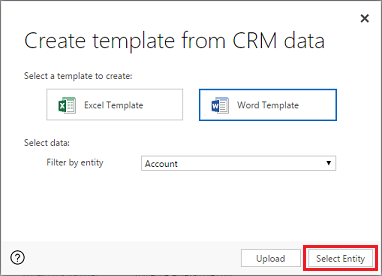
  • Click the “Excel Template” and then “Create Excel Template”,
  • Select the Word Template,
  • Select your Desired Entity,
  • Select any entities that may fit your needs, such as orders, invoices, thank you notes, etc. and download the template and open it.
  • It will open in MS Word as a Word document. Navigate the “Customize the Ribbon” from the right pane and turn on the developer tab to click “Display the XML Mapping Pane” under the developer tab.
  • Select “CRM” from the drop-down menu. When you start writing your document, right-click the fields to insert them into the document. You can insert, add, select from the table.
  • Now, populate the table with the contents you desire and save it.
  • Later on, you can upload your Word Template on Dynamics 365 and once the upload is complete, you can you the template whenever you want which will save lots of time at future work.

Role advantages of Word Template on Microsoft Dynamics 365:


  • If you need a form for more than once, a word template is like an application, just edit it with different user details, print it and deliver to the consumers. Thus save a lot of time and be more professional at work.
  • You just migrated your business, and need lots of invitation cards to send and aware your regular clients about your business, and you already have a template from the previous business? Think about, how much it’s saving for you, the same form, with new entities, people would love to see that.
  • Want some promotional offers to be sent to your clients, create a template and eliminate the busy work of creating the same documents over and over again.

Microsoft Dynamics 365 Marketing Campaign

Compared to the past, today’s marketplace is way more competitive due to available information and more demanding customers. In this competitive market, marketers need to handle customer insight so they can deliver the right message to the consumers at the right time. Here comes the effectiveness of the Microsoft Dynamic 365 Marketing Campaign. It allows you to create Campaign records to organize the efforts for the marketing of your business.
The marketing campaign also helps you to track the campaign spend and consumer’s response to let you know the effectivity of your marketing efforts. After distributing your marketing campaign, you can save the response records, contacts and customer’s information to help track their engagements.

Features of a campaign:

Microsoft Dynamics 365 has the smartest campaign system to boost your business and make the marketing campaign a successful campaign. Here are some of the elements that can assist you to have an excellent marketing campaign experience with Microsoft Dynamics 365 Campaign:

  • Using sales literature: Any sales literature you have created on your Microsoft Dynamics 365 can be associated with any individual campaign. This allows you to use more detail information on your marketing campaign to achieve a successful.
  • Target products: If you are using Microsoft Dynamics 365 product catalog for your business you can associate target products from the catalog to associate with your campaign. This ensures you to easily determine what products are being targeted in sales and marketing efforts. 
  • Planning activities: When you are intended to organize and operate your marketing campaign on Dynamics 365, planning activities comes in handy. You can add activities that you’re planning to do and analyze it from Dynamics 365 to find efficient strategies.
  • Campaign response: When the planning activities are done and you are ready with the most profitable strategies for your business, you need to analyze the customer’s responsibility to determine what they want. Campaign response allows to record consumer response and maximize the reduction of unnecessary products.
  • Price list: When your specific campaign is designed to include offers and promotions that involve a special price for products, the price list is an important feature to follow. The price list assists you to create lists with different price tags for different services.

How to create a marketing campaign?

In Microsoft Dynamics 365, go to the navigation bar to the Marketing area and follow the steps to create a marketing campaign:

  • Click Campaigns in the sitemap,
  • Add “New” campaign,
  • Submit the general information of your desired campaign,
  • You can also fill the financial information if you are planning on tracking campaign costs.
  • Now, you can add details information for your campaign.
  • Save and Close.

Why use a marketing campaign?

The marketing campaign of Microsoft Dynamics 365 collects data about how listed contacts interact with your different marketing initiatives. It has the behavior analysis section which automatically finds the matches between the visited user and your contacts. Thus improves the score of measurements and leads of your business. A marketing campaign makes it easy to generate more sales and ensures the rapid growth of your business.

Microsoft Dynamics 365 Sales 2018 features

Microsoft Dynamics 365 is evolving way faster than you can imagine because the team is continuously developing and updating this flagship customer relationship management solution. For the past few years, 2018 will bring us more updates and new functionality to Microsoft Dynamics 365.

Here are some of the new features currently under development and will be released in this year:

  • External project management integration: Microsoft Dynamics 365 is adding the external project management integration which will allow you to connect to the project management and resources and syncing contacts, projects, tasks, billing, expense reports, categories, forecast and purchase orders.
  • Multiple bin relations: When you are in a cluster picking scenario, this Multiple bin relation will allow you to assign new bins to the same work order. Thus, the cluster picking flow will continue without any problems. That means when this feature will be available on Dynamics 365,  one work order can be completed with multiple bin relations after picking the route is completed.
  • Retail layout designer: Retail layout designer is coming with more improvements with new screen layouts and printed/email receipt templates. After this update, you will be able to edit multiple layouts at the same time and switch between different layouts without saving them. It will allow you to quickly see the previous template without even closing the current editors.
  • On-premises data integration: On-premises data integration will allow you to import or export data in data management with integrated APIs. This will also provide the external application integration on Dynamics 365 for finance and operations with the capability to export or import data using data entities.
  • Inventory counting reason codes: Different reason codes as post counting journals, cycle counts, the adjustment in/out, spot count, threshold count will be added to the counting journals for both warehouse and mobile application. This feature will allow you to use standard finance and operations more efficiently and quickly on Dynamics 365.
  • Outbound shipment confirmation: With this feature of Microsoft Dynamics 365, the accepted ongoing project can automatically be decremented from the shipment. Because outbound shipment confirmation will allow the system to work with exception handling which either allows or block the process of shipping fewer quantities than originally requested.
  • Preparing materials for production and batch orders: In the jobs and people section on the production floor management workspace, a new list and materials will be added. This list will allow the Shop Floor supervisors to manage materials for specific orders to be applied for the coming period such as the next shift.
  • Power BI integration: With the new power BI integration on Dynamics 365, you will be able to discover reports by making them visible from your frequently used NAV lists. This will allow you to track your frequently used and ongoing projects, manage them directly from the lists and set or update alerts according to your best strategy to grow your business.

These are some of the upcoming features which are under development and will be released soon within this year. And there are some improvements which will be also added to the Dynamics 365, as:

  • Payroll import from QuickBooks,
  • Bulk invoicing improvements,
  • New automation for inbox and outbox,
  • Direct transfer orders,
  • Use the EU VAT number to update the contact name, and so on.

Microsoft Dynamics 365 Alerts

Do you still email your team members to notify them about the upcoming projects or want them to send you emails with progress records? Then you must live in the past because Microsoft Dynamics 365 has the smartest and improved alert system to control, monitor and notify your members about everything from giving them the next project schedule to arrange a meeting.


When you manage your projects in Microsoft Dynamics 365, the notification part can be done automatically using the Alerts feature. Dynamics 365 implementation requires that you work with your members as a team to complete different tasks to achieve the final goal. And when using the templates or checklists within the project management in Microsoft Dynamics 365 tool, each checklist and task need to be completed by everyone on the team, so you can set Alert to notify your members to get started.

What can Microsoft Dynamics 365 Alerts do for you?


  • When you assign resources to a project, Alerts will send a well-formatted email to your team members with complete details about the project, their role, and the deadline.
  • Alerts will also send an email to the project manager top notify him that a new project has been assigned with all the information he requires.
  • You can select a certain time period to get notification about the progress of the ongoing project using an alert on Dynamics 365.
  • Another alert will be sent to all the members when the project has been completed or a task has been updated or changed.

Set up your own custom alerts with Microsoft Dynamics is not a complex thing to do. You can create and assign an alert from the account section. For example, if you need to notify a project manager before three days, the project is due, you can create an alert using the time. Dynamics 365 will send a notification email to the project manager whoever I assigned and let him know the due date.
The alert helps you to manage your complex Microsoft Dynamics implementation. And it can help you and your professional team to stay up to date with the ongoing projects and aware of them if your projects are saying on the right track.

How to create an Alert on Dynamics 365:

Navigate to Dynamic 365, click on Sales and select Accounts as an example.

  • Now you can find New Alert and View Alert ribbon buttons.
  • To Create New click on NEW
  • Fill the Account details and Save it.
  • Now you can see the New Alert and View Alert for which you created.
  • Click on New Alert.
  • Clicking on New Alert Button a new window will open.
  • Enter the Description.
  • If the Alert you wish to keep as time-bound then Click Expires and select the date from Calendar.
  • If you wish to have this alert message as Pop-Up tick the popup box.
  • If you wish to have a notifications message in CRM as a notification, then select Notification.
  • Select the Type (Category) of alert – Informational as an example.
  • Click on the save button to save the Alert.

You can use alerts for your personal work and Dynamics 365 will notify you from time to time, and for the team to notify them as well.

Microsoft Dynamics 365 and SharePoint integration

SharePoint integration is the best additional feature in Microsoft Dynamics 365. Normally, a Customer Relationship Management (CRM) platform wasn’t designed to use as a storage server to manage and store documents. Thus, most people would save the documents as a note on their CRM applications. But, with the SharePoint integration system, Microsoft Dynamics 365 offers the best solution to manage, create and save documents. This built-in integration between Microsoft Dynamics and SharePoint is focused on saving data to the SharePoint library and manage them from Dynamics 365.

Enabling the SharePoint integration on Dynamics 365:

  • As the feature is built-in, so when you log in to Dynamics 365, it will prompt you with a notification to enable Server-Based SharePoint integration. To enable server-based SharePoint integration to follow these steps below:
  • Navigate to Settings>>Document Management>> and Enable server-based SharePoint integration.
  • Also, click on the yellow notification “Enable Now”,
  • A setup wizard will open where you need to put your SharePoint URL, fill the box and then click Next, and follow the steps to enable SharePoint integration on your Microsoft Dynamics 365 Online.
  • If you are using Dynamics 365 on your local machine or server, it may prompt you to install the Dynamic list component.

Advantages of integrating SharePoint with Microsoft Dynamics 365:

SharePoint integration changes the way how people used to know the CRM environment. Using SharePoint integration, here are some of the advantages Microsoft Dynamics 365 has to offer you:
  • SharePoint Integration is capable of syncing desktop libraries, and outlook data. So, if you have local files you need to manage via Dynamics 365, you can easily get it via SharePoint integration.
  • If you integrate SharePoint with Microsoft Delve, it will give you advance searching functionality to easily search documents from your library and manage them from Dynamics 365.
  • SharePoint integration on Microsoft Dynamics 365 allows you to use SharePoint native features as check-in/ check out and version history.
  • SharePoint provides the support to work with OneNote integration on your Dynamics 365.
  • It has 10GB of space as the standard package which is more than enough to manage all your documents from one big library.

When you have your Dynamics 365 with SharePoint integration enabled, just navigate to any records and documents and open the record. It will ask you to create a folder. If you proceed, the integration will create a folder in SharePoint using the record name and individual GUID to display the folder.

Drawbacks of SharePoint Integration on Dynamics 365:

Though the integration was intended to store data on SharePoint and manage it from Dynamics 365 and the result is beyond the expectation, it still has some limitation and drawbacks, as:
  • If you, unfortunately, delete a record from Dynamics 365, it will also be deleted from the SharePoint server, so you need to have a third option as a backup of your records.
  • SharePoint libraries subfolders will not be displayed on the Dynamics 365, although the documents will be visible.
  • If you delete the Dynamics 365 management application, the data will remain on the SharePoint library.
SharePoint is one of many integrations for Microsoft Dynamics 365, which plays its role perfectly. To learn about the Microsoft Dynamics 365 and SharePoint integration, check out this link.

Wednesday, December 18, 2019

Data Analytics Learning and Development (e Learning)

Due to the evolution of cloud-based data management and analytics, the capability and popularity of eLearning growing faster than ever. Today’s eLearning isn’t bound only within some computers or multimedia devices but a more comprehensive and integrated virtual learning system. Thanks to the development of data analytics and the technology to capture and storing the enormous amount of data, which plays the most important role to achieve effective learning experience.
What is Data Analytics?

eLearning is now ubiquitous. It is happening on web browsers and also on mobile devices like Android and Apple smartphones and tablets. In addition, learning is not limited to structured courses, it is happening through virtual classrooms, micro-learning, articles, videos and simulations and also through informal and social collaboration. eLearning standards and specifications have evolved to track all the learning activities across the spectrum of learning modalities that generate a ton of data for every single learner.

Due to these advancements, every single device is generating lots of data which is automatically being stored in cloud storage. These data contain information about different consumers which can be used as the key to aid them and fulfill their needs in an efficient way and improve business relationships as well. In order to do that, data scientists making programs to examine, analyze and draw conclusions about the existing data. This process is known as Data Analytics.
Data Analytics is the science of examining tons of raw data with the purpose of drawing conclusions about that information. Lots of companies and organizations use data analytics to improve their customer relationship status and make better decisions about the product/services.
Data Analytics & Visualization for Learning and Management:

Data analytics and Visualization are growing fields that offer lots of opportunities for learning and career growth. Data analytics and Visualization helps to explore existing data and assist in better decision making. It focuses on computational methods and statistics when it comes to content digital content and media management via Data Analytics which makes learning a lot easier and affordable for a wide range of learners including corporate and business explorers.

How Data Analytics Learning and Development helps to boost the eLearning experience?
With the recent digitization, the demand for familiarizing with cutting-edge technologies is rising. Thus, the eLearning process getting more popularity day by day. Learning of data analytics and development can help a business to keep up with the pace of the current demand for eLearning. Using different tools such as multi-source mapping, machine learning, and predictive analysis, it is easy to design systems that fit with the needs of data analytics and development, as well as make the eLearning a fast and efficient process. Learning and development of data analytics can also provide an analysis of the existing content of eLearning and social learning.

Data analytics in content delivery: Using machine learning and artificial intelligence (A.I) to analyze data, data analytics can attain the following goals:

  • Creates a dynamic course structure by collecting data from the individual user.
  • Gives recommendations and course materials based on the user’s personal interests,
  • Recommends the most accurate time structure for completing a specific course.
  • Able to add new badges and awards automatically when a user moves to the new level.
Data analytics in Social learning: For a corporate learner, the online form is the form of a discussion forum, tutorial’s blogs, wiki and some other content sharing platform which may refer to social media. Using data analytics in social learning, here are some of the phases that can be achievable:
Intelligent search results on a social media platform.

Adding a rating and reviews to help other learners around the environment.

Contribution can be rewarded as a fulfillment of the entire social learning cycle.
Data analytics identifies how the learners interact with the existing training contents, learning activities and with each other. Such interactions help educators to develop the system based on an accurate understanding of learner’s needs. However, most of the organizations aren’t aware of data analytics. They should understand the ecosystem of data analytics learning and development in order to achieve the best experience of eLearning and reshaping the training structure.


One of the Top Underrated Jobs in Tech: Quality Assurance.


Quality Assurance, the responsibility of maintaining the quality of a product is a vital part of the job while offering any product or services. Because, when it comes to offering any product or services to the large community of consumers, quality is the most important factor to consider. In order to make your service successful, you must examine every step of manufacturing until the release and delivery process. Due to different choices from various consumers, the quality assurance team can change the product or services regarding their needs. Thus, quality assurance positions exist in a wide range of industries including software and tech companies. Since it’s such an extended field, today’s discussion will be focused on technology and software.

What is Quality Assurance?

For a tech company, whenever it sales software or product developed by the developers, the Quality Assurance team or QA managers set specific requirements by analyzing the market and consumer’s needs. They also monitor customer feedback to make sure that the company requirements match consumer expectations, and maintain communication between the product development parties and the corporate offices of their company. From developing to delivering the products, Quality Assurance personnel are the middleman for a tech company and it’s the top underrated job.

What does Quality Assurance do for a tech company?

Every software and tech industry, quality assurance engineers are responsible for monitoring and maintenance the development and testing of services through every single phase of production. Quality assurance engineers research the development process, current market, and consumer’s expectation and analyze these results to improve:
  • The design quality of the products,
  • The efficiency of the services,
  • Making testing plans,
  • Creating reports for QA managers and more.

Why is Quality Assurance an important job?

Quality Assurance is a way of preventing mistakes or defects in developed software or products and avoiding further problems while delivering solutions to consumers. However, having a quality assurance team in a tech company is more than just maintaining the quality of the products. A well-experienced quality assurance team can handle the client’s demand and expectation from the highest level of satisfaction. They can also help beat the current competitors by analyzing the market in the long run. Quality assurance ensures detecting issues and shifts them to the preventions. Quality Assurance performs these tasks because,

Quality Assurance knows how to ask the right questions to the consumers: 

Sometimes, developers might seem two projects alike, but only the quality assurance team knows the differences by asking questions such as the number of users, why will it be used, what’s the peak usages time of the desired applications, etc.

Quality Assurance knows how to listen: 

Everyone has their own opinions, and when a tech company has something to offer to valuable clients, they must listen to them. Listening is a much harder skill than you can imagine. There are very few people available near you who can actually listen without interrupting. Quality assurance carefully listens to what the clients have to say and make decision combining their technical skills and consumers opinions to ensure the 100% satisfaction for both the company and the clients.

Q/A team knows how to focus on what business stakeholders care about: 

In a complete development process of an application or software, there are multiple phases available that can be handled by programmers, testers, QA managers and the business stockholders. As a quality assurance team, these people are able to convert the meetings of the different phases to an informational document that is relevant to the business and maintain the accomplishments of the whole company.

Quality Assurance knows how to manage time effectively: 

A few years back, quality assurance was a rare type of branch in all industries. However, businesses these days are all about managing the planning time, production time, and delivering time. Time is the vital thing to consider to maintain the reputation and keep up the business. Quality assurance helps the company to stay organized and plan ahead of the schedule that can save over a week of an on-going development process.

Quality Assurance improves employee morale: 

Some of the systems quality assurance such as total quality management involves all employees of the company to work together for assuring the best quality possible. This process improves the relationship between all the teams and the entrepreneurs. Improved employee morale results in less absenteeism and turnover among workers.

Quality assurance identifies the scraps: 

Sometimes client’s requirements don’t match with the company requirements and offerings. In this situation, quality assurance can identify such areas that result in scraps. When using the list from quality assurance, a company reduces its number of defective products, it experiences scrap reductions. Scrap reductions increase savings and identification of defective applications earlier can also minimize the total cost of the development process.


For a tech company, quality assurance is the major responsibility to ensure delivering the best products as well as maintaining the best customer relationship. When the game or software companies release their products, consumers critique quality assurance teams if they find any bugs or glitches. No one ever mentions the developer, because it’s the task of quality assurance personnel to maintain the quality of the software, games or application before making the initial release and delivering to the consumers. The quality assurance team needs to be skilled in both programming and communication to ensure gathering information from the client and making an effective requirement list for developers to get the most suitable product. Above were some of the tasks every quality assurance job holder able to perform and a brief discussion about why quality assurance is one of the underrated jobs in tech industries. The importance of a properly established quality assurance system is more than what was described in the above sections. However, those were the major importance of quality assurance as a job responsibility to understand that it can be the passport to your business.

How to Reset Windows 10 Password

Forgetting passwords is nothing new, but happens with most of us a lot of time. If you forget your computer’s password which is running on Windows 10, don’t panic! This tutorial will help you to reset Windows 10 password in several ways. Some of the methods may seem technical, but you will reset the password and make your Windows 10 computer usable again by following the steps.


Method 1: Using the Password reset disk function:

This is the official way to reset Windows 10 passwords. When you are using Windows 10, make sure to go to Control panel>> User accounts>>Create a password disk.

In this process, all you need is a USB drive and creating the password reset disk and follow the wizard. If you forget the password, you can use the USB and click RESET. Then follow the steps to reset windows 10 password.
The only drawback of this method is, it needs a password reset disk created before the password has been lost. So, if you don’t have the disk, follow the next method.

Method 2: Reset Windows 10 password online:

Another easy and quick method to reset Windows 10 password on your computer. If you log in your computer using the Microsoft account, then you can visit the Windows Live password reset page to reset the Windows 10 password.

Follow the steps to reset your password:

  •  Select “I forget my password” and click next.

  • On the next page, it will ask you to send a verification code to the phone or 2nd email.
  • Then check your message or e-mail and Enter the code into the box.
After the process is complete, you can log in to Windows 10 with the new password. But, this method has a drawback, which is you cannot use this method if your Windows 10 computer has no Microsoft account attached.

Method 3: Using MSDaRT to reset Windows 10 password:

MSDaRT is a Windows recovery software available for Technet Plus subscribers, MSDN subscribers, and Microsoft Volume customers. You can create a recovery CD with DaRT inside and boot from the USB.

Then from the LockSmith option under Microsoft Diagnostic and Recovery option, you can reset Windows 10 password.

Here is a complete guide to using MSDart to reset Windows 10 password: via TechNet.

Method 4: Using a third-party app to reset Windows 10 password:

PCUnlocker is a premium software to reset Windows 10 passwords. You need to visit their site and download the ISO image to create a Live CD.

After booting the Computer with Live CD/USB drive, you will see all accounts on your computer. And, from the menu, you will be able to:

  • Unlock locked account,
  • Reset account password,
  • Delete/Switch account,
  • Promote Guest account to Administrator, etc.
Method 5: Restore your Windows 10:

If you don’t want to use any of the above methods, or you have encrypted hard drive with bit-locker, you can restore your computer to the most recent state to reset Windows 10 password.

  • Hold SHIFT and click restart on the login screen,
  • When the computer restarts in “Advanced Startup,” select “Troubleshoot”
  • Then select “Advanced Option”
  • Select “System Restore” and follow the steps.

This process might take a while. You can select different options and restore points to do the system restore. And when the process is complete, you can access your computer as usual.

Tuesday, December 17, 2019

Steemit and DTube from Steem Community, Green Cryptocurrency Revolution?


If you are not under a rock, you have likely heard a lot of buzz about blockchain technology. There are countless contents on the web, enough chit-chatting on the local places, all are about how the blockchain technology is changing the entertainment industries, social media, and IT areas. But, what is it really? Are those people only making a fuss about cryptocurrency from everywhere? Let’s talk about blockchain technology. Details may seem a little bit technical, but the basic concept isn’t. Blockchain works like a chain of the network by a peer-to-peer connection from one computer to another and keeps track of the transactions. Where every computer in that network has access to an application to record the uses of data and transactions. Last week, I was explaining to some of my clients, “How blockchain works?” When, I said “this would be ideal for a Social media or video-sharing website, like YouTube” as a joke, one of them said, “Yes, there is a platform available, known as DTube, which also led me to Steemit –a blockchain community, where people get paid for their content.
Before starting to talk about Steemit and DTube, let’s look up the blockchain for a quick understanding, how it works and is it safe for you?

Recap: How does the blockchain works?

Suppose, you are going to exchange money to a stranger for a product purchased online, or you guys are having a bet. Though, you can get the products, when it comes to exchanging money between you and that person, there are three problems may occur:
  1. That person can run away without giving you the product,
  2. He can argue about trusting you and ask for the money before giving you the product, or
  3. Both of you can hire a third party, and hand over your money, products to that third party for claiming later. Oh, wait, the third party can also run away by ditching both of you.
To avoid this type of situation, blockchain technology was introduced. It allows you to generate code with the ledger where you can define a specific amount and when you are that person start the transactions, it won’t be stopped. And, after the period, it will be transferred safely to the right owner's account.

Blockchain is decentralized, open-source and cryptographic technology, which allows people to trust each other and transact peer to peer, making the need of the third party totally obsolete. This also ensures high security in every transaction. Cybercrime, like the hacking attack to a large centralized organization account (i.e. Banks) is a common problem nowadays. But, for blockchain, it’s impossible, as every transaction generates different hash codes and if someone wants to hack a block, that means he needs to hack every ledger in the network, which could be millions of blocks.

What is Steemit?

When you log in to regular social media websites, it only pleasures your eyes and you can communicate with friends and family. In the meantime, these websites are getting benefited by your time, attention and data from the lower block. Steemit is a social media platform by Steem, which doesn’t act like regular social media websites. In Steemit, users get benefits for creating content as cryptocurrency and Steem Power. Those cryptocurrencies then can be converted into local currency. That means you are not only an ordinary user but also a creator.

Why should you join Steem?

Recall the popular social media platform, Facebook and its total amount of users and the total value of Facebook today. But what about its user? You are not being benefited from Facebook rather than making some friends or getting likes on some status. But, in Steemit, every user who joins and create content can earn from the early stage. Of course, their earning depends on their level of activity and creation. As an example, here is a Steem statistic of a user which is always public for other users.

What are the Steem tokens?

Steem tokens are the token system to award the users on Steemit. Steem has three types of basic tokens:
  • Steem,
  • Steem Dollars (SBD), and
  • Steem Power (SP).
Steem and Steem Dollars are liquid, which means it can be freely used or store in your wallet, but the Steem Power is not liquid. That means, it must be powered down before being able to trade them. Blockchains like Steem and Bitcoin produce new tokens each time a block is produced by the system. In Steem, it’s a little bit different than bitcoin. The Steem blockchain allocates a majority of the fund to user accounts who are participating in the platform. But, newly generated bitcoin directly goes to the miners account only.

Voting Power on Steemit:

Another vital term to understand on Steem is voting power. Each account begins with 100 percent choice power. Each vote reduces the ability, and it replenishes over time. It takes concerning a pair of hours to refill the ability of one vote.
Using this tool you'll be able to see what quantity a user’s vote is value in step with their SP. for instance, as these words were written, whoever has 10000 SP and full choice power (100%) will generate 1.61$ for every one of his votes. During this web site, you'll be able to see the voting power standing of each alternative account.

How to earn on Steem?

If you sign up to Steemit, your registration will need to be approved by the team, which may take 24-48 hours for the signup to be complete. When you are done with signing up on Steemit, you are ready to create content and earn according to the level of your activity.
Upon joining you will receive 0.5 SP as a gift and 72 more SP as a loan. Votes generate revenue to the article writers. And to answer the upcoming question – yes, you can vote on your own content and earn from it. Steemit has a lot more to offer its users and readers, including SBD and ReSteem sharing. And, whoever gathers more than 500 SP can vote partially – it means he can play with the significance of the vote. Steemit has so many tools to offer, you just need to learn by experiencing the system.

Some statistics about Steemit:

  • 50,000 weekly active users on Steemit,
  • 100,000 daily posts posted by the users,
  • Current Steem price: 1.25$
  • Steam Market Cap: 323,391,378$
  • The number of existing Steem tokens: 238,529,864 Steem.
Recently, Steemit user builds a decentralized version of YouTube, known as DTube. Like the Steemit, DTube is also building upon STEEM blockchain.

Why DTube is better than YouTube/Facebook?

DTube is an in-browser application that allows content creators to earn rewards for their content. The built-in reward-earning mechanisms of the STEEM cryptocurrency also facilitate the social aspect that DTube is trying to manifest; rewarding users for uploading content.
  • DTube doesn’t have much competition yet, which is perfect for a new beginning.
  • DTube features easy and fast upload.
  • DTube has more visibility, a higher chance to be seen by different audiences.
  • DTube offers a reward for each and every content an uploader uploads on this platform.
  • And furthermore, being a decentralized website, DTube doesn’t need to earn from annoying advertisements, it has a blockchain who will provide the earning.
A quick look at the Steem API:
As an open-source library, Steemit shares its database with everyone. So a user can easily interact with the Steem blockchain, which can get information on account details, contents, blocks and much more. The developer portal will also serve as a toolbox for Steem clients, libraries, and language wrappers.
  • Availability:
You can start using the library with just a few lines of code, like:
from steem import Steem
s = Steem(keys=['<private_posting_key>', '<private_active_key>']) to import your steam account. Yet, using an encrypted wallet is the recommended way.
  • Choosing a library:
Getting started to develop robust and feature-rich Steem applications is a lot easier than you can imagine using Steem API. Accessing Steem data is user-friendly and not complex from various options depending on your infrastructure and objectives.
Building a picture discovery app is a breeze with the JavaScript library. There is also a Python library available, Steemit.com and SBDS services, as well as many third-party developer projects which could be beneficial for your Steem project.
  • Using steemd Nodes:
Applications that interact directly with the Steem blockchain will need to connect to a steemd node. Developers can use public nodes for their needs or can also run private nodes for their own instances. Here are the currently available public nodes of steemd nodes:
It also has the JavaScript and Python libraries to choose from regarding your developing experience and a large community of Ruby client, SteemSQL (MySQL) and MongoDB to choose from and develop applications on your needs.

Both Steemit and DTube offers something new to the users who used all their energy for nothing at the so-called social media websites and video sharing platforms. Steem should have come sooner to make people realize that their words, times and contents worth something.

Monday, December 16, 2019

How to Fix 100% Disk Usage on Windows 10 Task Manager

Sometimes, Windows System Process or different applications like chrome, skype or Microsoft Office can force your Windows 10 to utilize most of the hard drive. 

This issue is known as the 100% disk usage problem. If you are a regular computer user, you may see some glitches on the cursor or slow loading explorer effect if your Windows 10 is using the 100% of the available hard disk. Navigate the “Task Manager” and you can be sure watching the disk usages right under the process tab. There are several ways to fix 100% Disk usage on Windows 10 because there are various reasons behind the issue.

Who are the culprits?

Well, it depends on the computer because sometimes some system processes can trigger a 100% disk usage issue, and sometimes it can happen for Google or Skype’s rough usage. So, the first thing you need to do is, determining the culprits. To do that, open the task manager and find out which process is using most of the disk. Then follow the steps below to fix 100% disk usages on your Windows 10 Computer.

If “System” is using the 100% of the hard disk:

  • Disable Windows Search:
Step 1: Press “Windows+X” and click “Command Prompt (Admin)” from the opened tab.

Step 2: Type net.exe stop "Windows search” and hit Enter. Windows will stop the search process.


Step 3: Now, press “Windows+R” and type “services.msc” on the appeared text bar and click “OK”.

Step 4: A Services tab will appear. Find Windows Search and right click and open “Properties.”


Step 5: Change the Startup Type to “Disable” from the scroll menu and click “Apply” and “OK”.


  • Disable SuperFetch services:
Step 1: Open Command Prompt with Admin (See above: Step 1)

Step 2: Type net.exe stop superfetch and hit Enter. Then wait a minute and check the computer to start getting better.


If disabling Windows Search and SuperFetch didn’t solve the problem, then disable your Antivirus and uninstall any recent Flash Player update.

If “Google Chrome” is causing the problem:

Step 1: Open Google chrome and got to settings. Click “Advanced” and find “Use a prediction service to load pages more quickly.”
Step 2: If you see, the option is enabled, disable it and restart Chrome.
This will solve the 100% disk usage problem caused by Google Chrome on your Windows 10 computer.


If “Skype” is causing the problem:

Step 1: Open File Explorer and go to this location: "C:\Program Files (x86)\Skype\Phone\"


Step 2: Right-click on “Skype.exe” and click “Properties” and then open the “Security” tab.


Step 3: Click the “Edit” option and select the “ALL APPLICATION PACKAGES” and then tick in the "Write" box.


Step 4: Click “Apply” and “OK” and then “Ok” again.
Now, Skype will no longer use the process of the hard disk to use inappropriately.

Final TIP: You don’t need to apply all the methods described above, but you can follow them if you can’t determine, what causing the 100% disk usage on your Windows 10 computer. The above methods work with other Windows versions as well, but the user interface may look different than the provided screenshots.


Sunday, December 15, 2019

How to Make a Subscription E-commerce Website

The subscription-based e-commerce site is a key feature to ensure the success of any online business. No matter how small your business is, someday, it will grow eventually. 

And, a subscription-based e-commerce site for your products and services can boost the speed of that growth. With a subscription-based e-commerce site, you can manage a group of customers in a professional manner and constantly try to improve customer satisfaction. Moreover, if you have a subscription-based e-commerce site, you don’t need to worry about new customers, instead, you can focus on the current subscribers to satisfy them and make a wave of recurring income. You might not know how exactly a subscription e-commerce site works. In that case, take Netflix who offers digital content to the subscribers and doesn’t need physical shipping or Dollar Shave Club, who also uses a subscription system but uses physical shipping to deliver Shaving products as examples. Subscription e-commerce can be ideal for any type of product from digital media to beauty products. It works perfectly to boost the business if done right. However, the point is how do you make a subscription e-commerce site?

There isn’t just one answer to make a subscription e-commerce site. There are lots of options, different platforms, and systems available to get it done. However, there are some of the key concepts you must take care while choosing any of the methods to make your subscription e-commerce site. Here are a few things to keep in mind:
  • Security: As a business owner, protecting customer’s data is your top priority. So, make sure to choose a secure way to make a subscription e-commerce site.
  • Costs: If you are a small or medium business owner, you must evaluate the cost of different packages and choose the best one that fits your business.
  • Capabilities: Different subscribers have different choices, some may want to pay yearly while some are willing to do monthly subscriptions. Make sure that your system has these types of capabilities.

If you already have a Shopify or WooCommerce website, you can find an application or extension to make your existing website a subscription-based e-commerce site. 

And, if you are going to make it from scratch, there are lots of web-developers, website-builders and third-party subscription companies available. All you need to do is choosing the best service that suits your products. Here are some of the well-known services that can be used to make a complete site for your business:


  • WooCommerce: WooCommerce is a subscription extension that can be used on WordPress site. It supports more than 25 payment gateways. And the perfect combination of WordPress and WooCommerce lets you make a highly customizable site and allows you the complete control of your website.

  • Shopify: Shopify is the most used platform for e-commerce purposes. Though Shopify doesn’t have the proper built-in feature to make a complete subscription site, there are lots of apps and teams available such as egenz to make secure and affordable subscription sites. The best thing about using Shopify is you don’t have to pay for any transactions. Moreover, the custom application integrates well with the Shopify theme design. There are also some interesting extra features like referral systems, bulk imports and shipping carrier integrations available on Shopify.
  • LemonStand: LemonStand is a complete subscription suite without having to install any third-party applications. By choosing LemonStand, you don’t need to worry about finding subscription services because they have integrated everything you need for your business and the plans start with $19 per month. People who want everything to manage from one platform, LemonStand will be the ideal solution for them.
  • WordPress/MemberPress Plugin: The final solution for a subscription site is the MemberPress plugin offered by WordPress. MemberPress is a standalone plugin that integrates with your existing WordPress website. As with WooCommerce, MemberPress involves installing an extra plugin and configuring it from scratch. The setup isn’t all that bad, and you get features like coupons, user accounts, membership controls, reminders, and pretty much everything you would need for a subscription site.

To wrap things up, here is what you need to do to make a successful subscription site:

  • Choose the best platform to make your business website.
  • Make sure to find the best service package compatible with both websites and businesses.
  • Find the best application or extension for the subscription system regarding cost and security.
  • Launch your site earlier than the products.

And finally, start interacting with your subscribers.

After going through all the above, if you start wondering about why your business needs a subscription e-commerce site, keep in mind that having 3000 customers who pay $50 per month is far low riskier than having 50 customers who pay $3000 once to purchase your services. A subscription makes the recurring income for your business which is constant and constant growth is the best solution to move forward even if the amount is small. However, that doesn’t mean all you need is to launch a subscription e-commerce site for your business and you are done. To make progress while you have the best environment ready for the customers, here are some tips to achieve success:

  • Create a business plan. Even though companies like Netflix make it easy to create a subscription business, don't be tempted to launch a business on a whim. Do the market research for your products and services and write a solid plan.
  • Create a website with a clean and professional design. Consumers won't just hand over their sensitive information such as credit card or payment details for recurring charges for a product that has a sketchy website.
  • Know your target audience well. Market to those who are mostly interested in the products or services you offer. The theme of your business should "fit" into the current market.
  • Determine how you will provide value to your customers while still creating a profit. Start interacting with the subscribers from the start and leave a feedback option for them. It will help you to understand what they want. Ask yourself some questions such as: Will you buy the products as a consumer? Are you impressed with the services offered comparing with the competitors in the current market? These questions will help you to improve customer relationships and product satisfaction.
  • Carefully determine the pricing of your products. While it may seem smart to keep your price as low as possible, you don't want to price yourself out of offering really excellent products.

Making a successful subscription e-commerce site is a fairly complicated and important choice as it’s one that strongly impacts your day-to-day business and far more complicated to change later. Fortunately, most of the platforms mentioned above offer free trials. You can start using any of those to determine the exact solution to make a subscription e-commerce site.

How to Set up Email on Your Android Phone


Android was the fastest growing mobile operating system in 2009 and after a decade the pace hasn’t slowed down a bit. Statistics in 2019 showed that there are more than 2.5 billion active android devices available across the world. With this much growth, lots of manufacturers were involved to produce lots of android devices. As a result, Android devices have a massive variety of design and internal software distribution. Therefore, it might be confusing to set up email on your Android phone as soon as you get it.

Use the following steps to Set up Email on Your Android Phone:


Using the Gmail App: Before you begin, go to Play Store and search for Gmail, and select Update.
Open the Gmail app and tap to the menu icon on the upper left side.

You can use any of the options regarding your email service.

If it’s a Gmail account, click Google; for Microsoft account, click Outlook, Hotmail and Live; For Yahoo account, Click Yahoo; for Exchange Email, click Exchange and Office 365 and for a custom domain Email, click Other. After that, follow the next Screen.
  • Enter your full email address and tap Next. 
  • Then, enter your password and tap Next.
  • Follow any prompts you may get to sign in to different email accounts:
  • Finally, go to the inbox of your Gmail app and navigate the emails from the account you just set up.
Manual Method: If you are unable to sign in to your custom email account, then follow the manual set up below:
  • Open the Gmail app. Go to Settings > Add account > Other.
  • Enter your full email address and then tap Manual Setup:
  • From the list you should now a list, choose POP3 ACCOUNT, IMAP ACCOUNT, or MICROSOFT EXCHANGE ACTIVESYNC based on your account type.

You can choose Personal (IMAP) or Personal (POP3) and then enter your password and tap Next.
If you’re prompted to enter settings, use these for the options available, such as:
Domain\Username: Enter your full email address here.
Password: Use the password you use to access the Email.
Server: Use a specific server for your Email. For example imap-mail.outlook.comfor an outlook account.
Port: Use the port.
Security Type: Select SSL/TSL and tap Next.
Follow any prompts you may get, including security permissions and setting a display name.
You’re now ready to use your email in the Android Gmail app!